
More actionable information
We’ve reclassified and improved all our Lennox iComfort thermostat alert codes to provide better prognostics and diagnostics. Dealers and homeowners have been overloaded by non-urgent error code alerts. Not only do codes and alerts chip away at the reliability of the product, but they also diminish the trust between you and the homeowner as it appears — you’re trying to get a service call.
Intuitive language, no distracting graphics, or blaring notifications
New error codes and notifications are now displayed using concise, easy to understand language providing technicians with intuitive, more actionable information. You’re able to identify exactly which component or piece of equipment is triggering the error code without troubleshooting or running checks. Techs save time and can quickly move onto the next job. We’ve toned down the iComfort screen alert graphics so they’re subtle and occupy less screen presence while reducing anxiety for homeowners by avoiding shock wording.
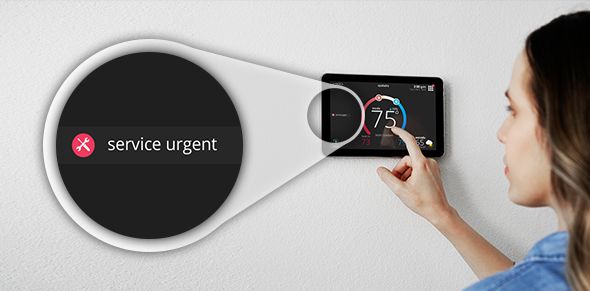
New & improved UI
Graphics that are less
obtrusive & reduces
anxiety for homeowners
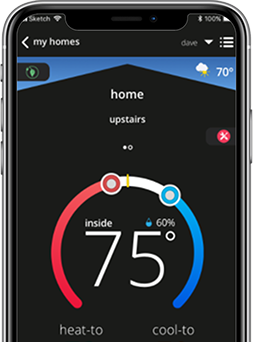
Older Alerts
Previous graphics were
too “loud” and alarmed
the homeowners
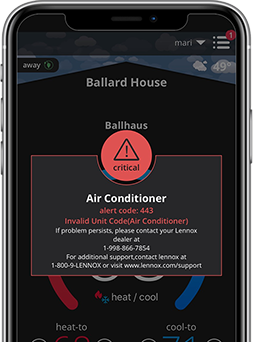
A manageable framework to clarify your priorities
To help you prioritize error code alerts better we grouped them according to the action required. We created the following five alert groups. As new codes are created for new equipment, they will fall into one of the alert groups:

Service Urgent
This is a No Heat/No Cool situation for your homeowner or No Ventilation. This could cause equipment or property damage. These alerts require a service call within 24-hours.

Service Soon
Homeowner’s system is in partial operation and is not meeting the setpoint or the homeowner’s perception of comfort. The simplest example is a two-stage system that can only operate in the first stage. These require a service call within 24-48 hours.

Service Soon/Service Urgent
These codes can start as a Service Soon and can escalate to a higher level – Service Urgent – after a set parameter of cycles or time.

Maintenance
These are alerts for items you can set reminders or plan intervals, for example, a reminder to replace filters or UV bulbs. You can also set an alert for a required 'tune-up’ or to clean a piece of equipment.

Information Only Dealer
This alert indicates the system is doing what it’s intended to do. Data will be accessible to you as a system history of equipment operation.

I like how the new alerts will be to the side and not take up the whole screen. I think this will help homeowners not panic as much especially if the alert is not critical.
Anonymous
New two alpha code alert instantly identifies the equipment impacted
Another new addition you’ll see is the list of two alpha error code alerts displaying what piece of equipment is causing the alert such as a heat pump or the gas furnace. We tell you upfront the equipment impacted to avoid the tech having to check every piece of equipment. This allows them to easily troubleshoot the system and get out the door to another service call.
The list includes:
- AC = Air Conditioner
- AH = Air Handler
- GF = Gas Furnace
- ID = Indoor Unit (AH or GF)
- HP = Heat Pump
- OD = Outdoor Unit (AC or HP)
- PA = PureAir S
- TS = Thermostat
- ZS = Zone System
- OD = Outdoor Unit (AC or HP)
- PA = PureAir S
- TS = Thermostat
- ZS = Zone System
Example:
Current Error Code: 204 Gas Valve Problem
New Error Code: 204 GF Check Gas Valve
Error code says there’s a gas valve problem. With the reclassification, it will specify GF for the gas furnace and will indicate you need to check the gas valve.
Simplifying our email alert notifications
We’ve made changes to the emails you and the homeowner receive when an alert is triggered. Homeowners will only receive two messages:
1: An iComfort Service Urgent alert email notifies the homeowner their thermostat has generated an alert and requires service within 24 - 48 hours. Currently, the system shows a “No Heat” or “No Cool” status. The email also says an alert has been sent to their dealer to get the issue resolved as soon as possible.
2: The second iComfort alert email will be sent once the alert is resolved. It will indicate to call the dealer if the homeowner has any additional questions or concerns.
Restoring your trust
Our new reclassified error codes, alerts, notifications, and subtler graphics will help you establish better trust and confidence between you and your homeowner. You’ll not only reduce the number of nuisance alerts, but you’ll also decrease wasted service calls. Plus, error codes are now easier to comprehend and offer your techs more actionable information in an easy prioritized framework so they can quickly solve the problem and move on to the next job, faster!
All these changes are also reflected in the Error Code Lookup tool and on our Service Dashboard.


Looking for more digital tools?
LennoxPros is an online resource that helps you succeed in every aspect of your business. We deliver integrated products that make
your business processes more effective and efficient, helping you service your customers better.